7. FRCap case
7.1. FAIRINO Palletizer
It can be used after uploading the “Palletizer.plugin” under the build folder in the project to the WebApp and registering it.
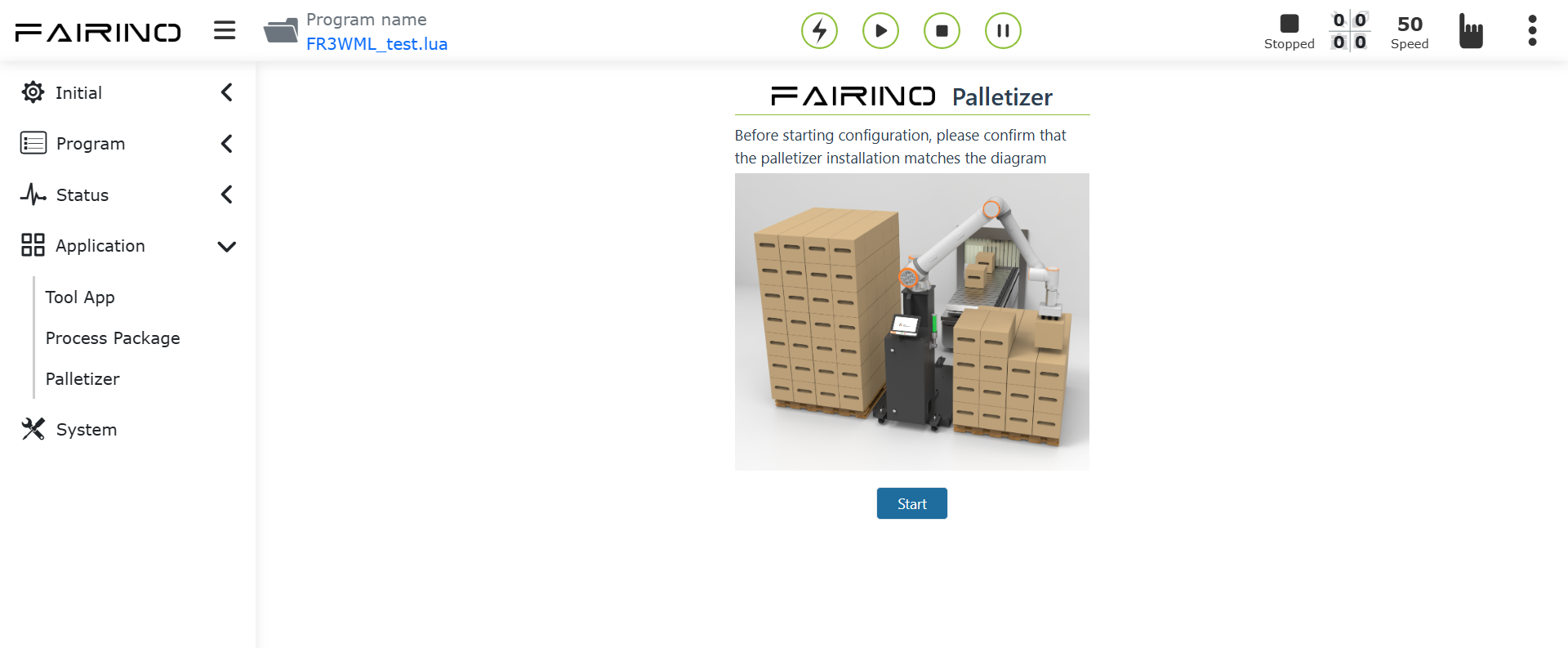
Figure 7-1 Use of FRCap for palletizing
7.1.1. Palletizing workpiece configuration
Command name: palletizing_config_box.
Command parameters:
1/**
2* @param  int length piece length
3* @param  int width workpiece speed
4* @param  int height Work piece height
5* @param  int payload artifact payload
6* @param  string grip_point workpiece grip point
7* /
Instruction example:
 1{
 2   cmd: "palletizing_config_box",
 3   data: {
 4      length: 800,
 5      width: 615,
 6      height: 312,
 7      payload: 2.34,
 8      grip_point: "grippoint"
 9   }
10}
Command feedback:
1/**
2* @return status:200 "success"
3* @return status:404 "fail"
4*/
7.1.2. Palletizing pallet configuration
Command name: palletizing_config_pallet.
Command parameters:
1/**
2* @param  int front tray front
3* @param  int side tray side
4* @param  int height Pallet height
5* @param  int left_pallet left tray enabled
6* @param  int right_pallet Right tray enabled
7*/
Instruction example:
 1{
 2   cmd: "palletizing_config_pallet",
 3   data: {
 4         front: 1200,
 5         side: 1000,
 6         height: 110,
 7         left_pallet: 0,
 8         right_pallet: 1
 9      }
10}
Command feedback:
1/**
2* @return status:200 "success"
3* @return status:404 "fail"
4*/
7.1.3. Advanced palletizing configuration
Command name: palletizing_advanced_cfg.
Command parameters:
 1/**
 2* @param  string height grab point lifting height
 3* @param  string x1 palletizing progressive point 1: x offset in x direction, unit mm
 4* @param  string y1 palletizing progressive point 1: y offset in x direction, unit mm
 5* @param  string z1 palletizing progressive point 1: z offset in x direction, unit mm
 6* @param  string x2 palletizing progressive point 2: x offset in x direction, unit mm
 7* @param  string y2 palletizing progressive point 2: y offset in x direction, unit mm
 8* @param  string z2 palletizing progressive point 2: z offset in x direction, unit mm
 9* @param  string time suction waiting time, unit ms
10*/
Instruction example:
 1{
 2   cmd: "palletizing_advanced_cfg",
 3   data: {
 4   height: "1000",
 5         x1: "100",
 6         y1: "100",
 7         z1: "100",
 8         x2: "10",
 9         y2: "10",
10         z2: "10",
11         time: "1"
12      }
13}
Command feedback:
1/**
2* @return status:200 "success"
3* @return status:404 "fail"
4*/
7.1.4. Palletizing equipment size configuration
Command name: palletizing_config_device.
Command parameters:
1/**
2* @param  int x absolute value of the upper right corner of the left pallet relative to the coordinate axis of the robot base coordinate system in the x direction
3* @param  int y absolute value of the upper right corner of the left pallet relative to the coordinate axis of the robot base coordinate system in the y direction
4* @param  int z absolute value of the upper right corner of the left pallet relative to the coordinate axis of the robot base coordinate system in the z direction
5* @param  int angle angle when the robot is installed
6*/
Instruction example:
1{
2   cmd: "palletizing_config_device",
3   data: {
4      x: 2400,
5      y: 1800,
6      z: 120,
7      angle: 0
8   }
9}
Command feedback:
1/**
2* @return status:200 "success"
3* @return status:404 "fail"
4*/
7.1.5. Palletizing mode configuration
Command name: palletizing_config_pattern.
Command parameters:
 1/**
 2* @param  int layers palletizing layers
 3* @param  int box_gap Workpiece pixel spacing, unit: mm
 4* @param  string sequence palletizing working mode
 5* @param  int pattern_b_enable Whether mode b is turned on, 1: turned on, 0: not turned on
 6* @param  string left_pattern_a Left station mode a Cartesian coordinates
 7* @param  string left_pattern_b Left station mode b Cartesian coordinates
 8* @param  string right_pattern_a Right station mode a Cartesian coordinates
 9* @param  string right_pattern_b Right station mode b Cartesian coordinates
10* @param  string origin_pattern_a Initial mode a Cartesian coordinates
11* @param  string origin_pattern_b Initial mode b Cartesian coordinates
12*/
Instruction example:
 1{
 2   cmd: "palletizing_config_pattern",
 3   data: {
 4      layers: 8,
 5      box_gap: 0,
 6      sequence: "a,b,a,b,a,b,a,b",
 7      pattern_b_enable: 1,
 8      left_pattern_a: "{\"1\": [[1,2,3,0.1,0.2,0.3],[1,2,3,0.1,0.2,0.3],[1,2,3,0.1,0.2,0.3]]}",
 9      "left_pattern_b": "{\"1\": [[1,2,3,0.1,0.2,0.3],[1,2,3,0.1,0.2,0.3],[1,2,3,0.1,0.2,0.3]]}",
10      "right_pattern_a": "{\"1\": [[1,2,3,0.1,0.2,0.3],[1,2,3,0.1,0.2,0.3],[1,2,3,0.1,0.2,0.3]]}",
11      "right_pattern_b": "{\"1\": [[1,2,3,0.1,0.2,0.3],[1,2,3,0.1,0.2,0.3],[1,2,3,0.1,0.2,0.3]]}",
12      "origin_pattern_a": "[]",
13      "origin_pattern_b": "[]"
14   }
15}
Command feedback:
1/**
2* @return status:200 "success"
3* @return status:404 "fail"
4*/
7.1.6. Palletizing program generation
Command name: generate_palletizing_program.
Command parameters:
1/**
2* @param  string palletizing_name name
3* @param  string depalletizing_name Destacking name
4* @param  string flag the palletizing or depalletizing program is generated, 0-not generated, 1 generated
5*/
Instruction example:
1{
2   cmd: "generate_palletizing_program",
3   data: {
4      palletizing_name: "palletizing_1",
5      depalletizing_name:"depalletizing_1",
6      flag:"[0,1]"
7   }
8}
Command feedback:
1/**
2* @return status:200 "success"
3* @return status:404 "fail"
4*/
7.1.7. Get palletizing recipe
Command name: get_palletizing_formula.
Command parameters:
1/**
2* @param  string name palletizing recipe name
3*/
Instruction example:
1{
2   cmd: "get_palletizing_formula",
3   data: {
4      name: "palletizing_1"
5   }
6}
Command feedback:
 1/**
 2* @return status:200
 3* @param  object box_config artifact configuration
 4* @param  object pallet_config pallet configuration
 5* @param  object device_config Installation device location
 6* @param  object pattern_config Mode configuration
 7* @param  object program_config Procedural build configuration
 8* @param  object lefttransitionpoint left transition point
 9* @param  object righttransitionpoint Right transition point Cartesian coordinates
10* @param  object advanced_config advanced configuration
11* @return status:404 "fail"
12*/
Instruction feedback case:
 1{
 2   "box_config": {
 3     "flag": 1,
 4     "length": 200,
 5     "width": 400,
 6     "height": 300,
 7     "payload": 2.34,
 8     "grip_point": "grippoint"
 9   },
10   "pallet_config": {
11     "flag": 1,
12     "front": 1000,
13     "side": 1200,
14     "height": 110,
15      "left_pallet": 0,
16      "right_pallet": 1
17   },
18   "device_config": {
19   "flag": 1,
20   "x": 2400,
21   "y": 1800,
22   "z": 120,
23   "angle": 0
24   },
25   "pattern_config": {
26   "flag": 1,
27   "layers": 8,
28   "box_gap": 0,
29   "sequence": "a,b,a,b,a,b,a,b",
30   "pattern_b_enable": 1,
31   "left_pattern_a": "{\"1\": [[1,2,3,0.1,0.2,0.3],[1,2,3,0.1,0.2,0.3],[1,2,3,0.1,0.2,0.3]]}",
32   "left_pattern_b": "{\"1\": [[1,2,3,0.1,0.2,0.3],[1,2,3,0.1,0.2,0.3],[1,2,3,0.1,0.2,0.3]]}",
33   "right_pattern_a": "{\"1\": [[1,2,3,0.1,0.2,0.3],[1,2,3,0.1,0.2,0.3],[1,2,3,0.1,0.2,0.3]]}",
34   "right_pattern_b": "{\"1\": [[1,2,3,0.1,0.2,0.3],[1,2,3,0.1,0.2,0.3],[1,2,3,0.1,0.2,0.3]]}",
35   "origin_pattern_a": "[]",
36   "origin_pattern_b": "[]"
37   },
38   "program_config": {
39   "palletizing_name": "palletizing_1",
40   "depalletizing_name":"depalletizing_1",
41   "flag":"[0,1]"
42   },
43   "lefttransitionpoint":{
44   "j1":"120",
45   "j2":"120",
46   "j3":"120",
47   "j4":"120",
48   "j5":"120",
49   "j6":"120"
50   },
51   "righttransitionpoint":{
52   "j1":"120",
53   "j2":"120",
54   "j3":"120",
55   "j4":"120",
56   "j5":"120",
57   "j6":"120"
58   },
59   "advanced_config":{
60   "height": "1000",
61   "x1": "100",
62   "y1": "100",
63   "z1": "100",
64   "x2": "10",
65   "y2": "10",
66   "z2": "10",
67   "time": "1"
68   }
69}
7.1.8. Get the list of existing formula names for palletizing
Command name: get_palletizing_formula_list.
Command parameters: None
Instruction example:
1{
2   cmd: "get_palletizing_formula_list"
3}
Command feedback:
1/**
2* @return status:200
3* @param  Array ${name} palletizing name list
4* @return status:404 "fail"
5*/
Instruction feedback case:
1["palletizing1"]