1. Overview
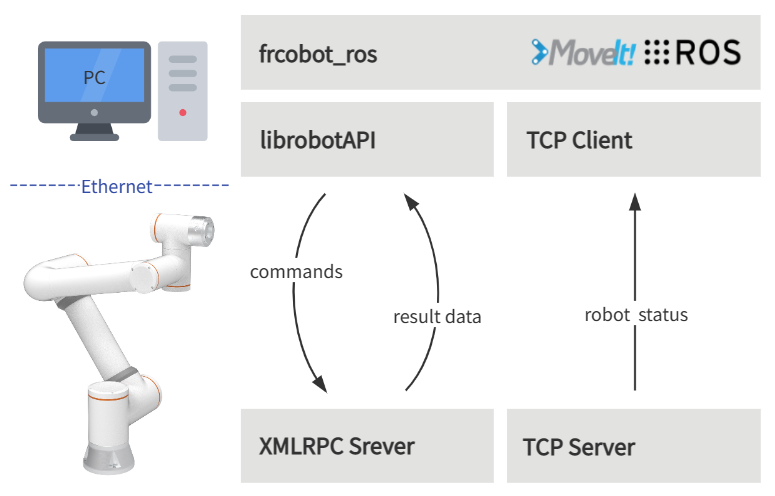
The brief architecture of frcobot_ros is shown in the figure below. The collaborative robot side provides an XMLRPC server and a TCP server.
The XMLRPC server mainly provides the robot command API to complete the robot movement and state value acquisition function, which is mainly based on the C++ SDK.
The TCP server of the state feedback provides real-time feedback of the state of the robot, and the feedback period is 8ms.
ROS and Moveit! have been installed on the user’s PC, and frcobot_ros has been compiled. Each function package in frcobot_ros includes the lib library of the robot API, and establishes a TCP client in frcobot_hw to communicate with the robot status feedback server to obtain robot status feedback data.
2. Install
This chapter introduces how to build frcobot_ros and the required installation environment.
2.1. Environmental requirements
The recommended environment for frcobot_ros is as follows:
Note
Ubuntu 18.04 LTS Bionic Beaver & ROS Melodic Morenia
Ubuntu 20.04 LTS Focal Fossa & ROS Noetic Ninjemys
The instructions below are for Ubuntu 20.04 LTS systems and ROS Noetic Ninjemys. If you are using Melodic, replace noetic in the command line with melodic.
2.2. ROS installation & requirements
After installing the Ubuntu system, Install and configure the ROS Noetic environment.
After configuring ROS Noetic, install the required environment as follows:
1echo "source /opt/ros/noetic/setup.bash" >> ~/.bashrc
2source ~/.bashrc
3sudo apt-get install -y \
4    ros-noetic-rosparam-shortcuts \
5    ros-noetic-ros-control \
6    ros-noetic-ros-controllers \
7    ros-noetic-moveit \
8    libxmlrpcpp-dev
2.3. Compile
After ROS Noetic is properly installed and configured, create a Catkin workspace in a directory of your choice.
1mkdir -p ~/catkin_ws/src
2cd ~/catkin_ws
3catkin_init_workspace src
Then clone the frcobot_ros library from Github.
1cd src
2git clone https://github.com/FAIR-INNOVATION/frcobot_ros.git
Build the frcobot_ros package
1cd ~/catkin_ws
2catkin_make
3echo "source ~/catkin_ws/devel/setup.bash" >> ~/.bashrc
4source ~/.bashrc
If an error occurs, please check whether the packages in the ROS installation requirements have been installed successfully. After the compilation is complete, copy the lib library to the ROS lib environment (the path is: /opt/ros/noetic/lib), so that the program can run normally .
1# The default path of catkin_ws here is "~", if it is different, just change "~" to the actual path
2sudo cp ~/catkin_ws/src/frcobot_ros/frcobot_hw/lib/* /opt/ros/noetic/lib
3. Quick start
3.1. frcobot_hw
frcobot_hw mainly provides basic functions for communicating with collaborative robots.
Note
Contains the collaborative robot status feedback msg
Provide command demos for controlling collaborative robots
Provide collaborative robot status feedback nodes and topics
The status node and command demo can be quickly started through the launch file
The content of frcobot_hw.launch is as follows:
 1<launch>
 2
 3    <!-- params -->
 4    <param name="robot_ip" type="string" value="192.168.58.2"/>
 5    <param name="robot_port" type="int" value="8083"/>
 6
 7    <!-- frcobot status node -->
 8    <node pkg="frcobot_hw" type="frcobot_status_node" name="frcobot_status_node" output="screen" />
 9
10    <!-- frcobot control demo -->
11    <node pkg="frcobot_hw" type="frcobot_cmd_demo" name="frcobot_cmd_demo" output="screen" />
12
13</launch>
Important
robot_ipandrobot_portneed to be consistent with the IP and port of the controlled collaborative robotThe default IP of the factory robot is 192.168.58.2, and the user status feedback port is 8083
Use the following commands to quickly start the robot status feedback node and command demo functions.
1roslaunch frcobot_hw frcobot_hw.launch
Open a new terminal, and use the following commands to print and view real-time status feedback data.
1rostopic ehco /frcobot_status